CommandCast
CommandCast Pro — 24-Key RGB Studio Control Deck
CommandCast Pro — 24-Key RGB Studio Control Deck
- Regular price
- Price: $259.99
- Regular price
- List Price:
- Sale price
- Price: $259.99
- Unit price
- per
Couldn't load pickup availability
Out of stock
 PRODUCT DESCRIPTION
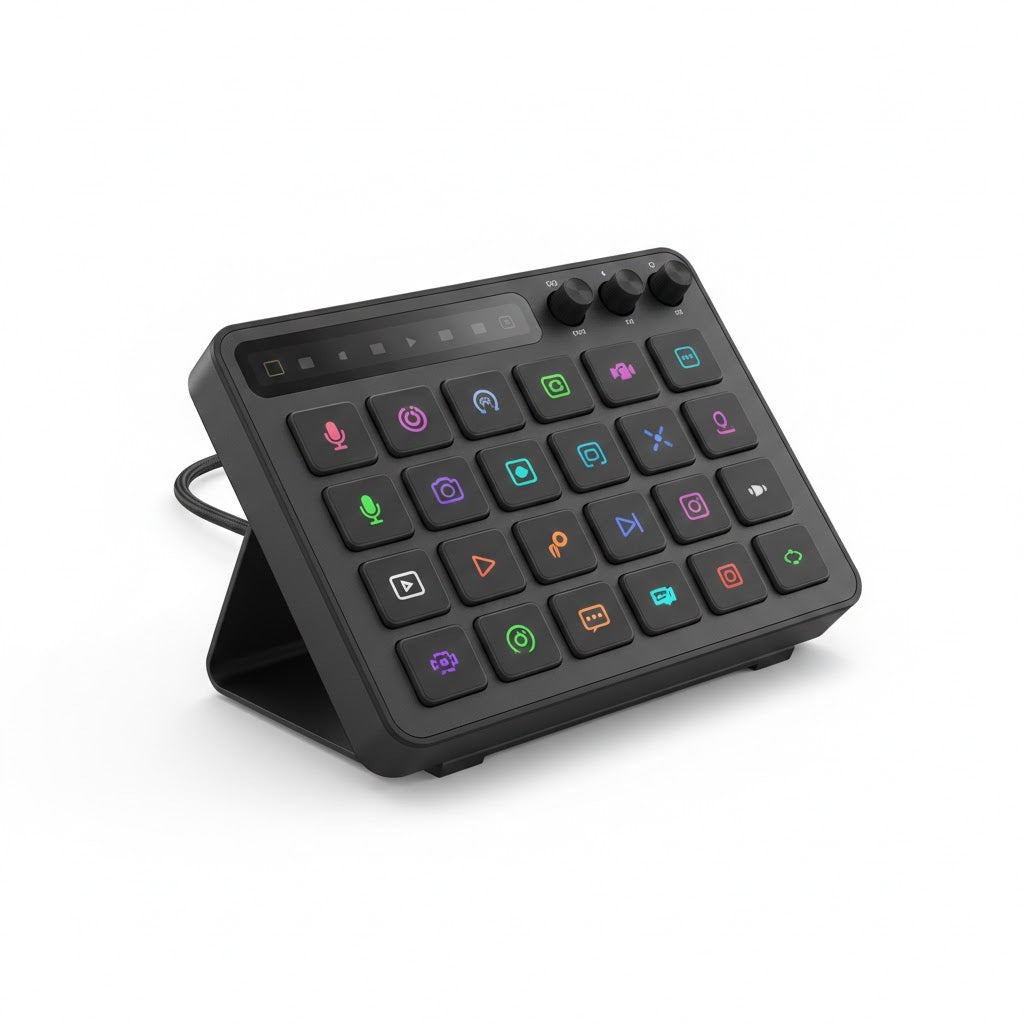
The CommandCast Pro is a 24-key programmable studio control deck designed for streamers, content creators, podcasters, and video editors who want tactile, instant access to every function in their production workflow — without touching a keyboard or hunting through software menus. Each key displays a full-colour icon indicating its assigned action, three analogue dials handle volume, gain, and monitor control, and a top status strip provides at-a-glance session feedback. Plug it in, assign your actions, and run your entire production from one compact panel on your desk.
Key Features
- 24 Fully Programmable RGB Backlit Keys — Every key on the 6x4 grid displays a customisable full-colour icon indicating its assigned function — scene switches, mute toggles, clip launches, chat interactions, alerts, and more. Icons update dynamically to reflect live state, so a muted microphone key shows its muted status in real time without guesswork.
- Three Analogue Dial Controls — Three smooth rotary dials positioned on the upper-right panel handle primary audio mixing functions: channel volume, monitor output, and gain or EQ adjustment. Each dial can be reassigned to any continuous parameter in your software stack — including OBS audio, DAW fader control, or application volume mixing.
- Integrated Status Display Strip — A slim horizontal display strip across the top of the panel shows session status, active profile name, connected platform indicators, and live viewer count or system data — keeping critical information visible without screen space.
- Multi-Layer Profile System — Assign unlimited profiles for different workflows — streaming, recording, podcast, video editing, meetings — and switch between them with a single key press. Each profile carries its own complete key layout and icon set.
- Broad Software Integration — Works natively with all major streaming and production platforms including OBS Studio, Streamlabs, Twitch Studio, Adobe Premiere, DaVinci Resolve, Zoom, and more. Actions are assigned through a companion desktop application with drag-and-drop simplicity.
- Adjustable Integrated Stand — The built-in fold-out stand positions the panel at an ergonomic viewing and reach angle, with a stable non-slip base that holds firm during rapid key sequences. No external stand or mounting hardware required.
- USB-C Wired Connection — Single USB-C cable handles both power and data with zero latency input registration. No wireless dropouts, no battery management, no pairing steps — just plug in and it is ready.
- Compact Professional Footprint — The entire panel fits within a standard A5 desk footprint, leaving room for keyboard and mouse without rearranging your entire workspace.
Why You Will Love It
Live production is not forgiving of hesitation. When you are mid-stream and need to switch a scene, fire a sound alert, toggle your camera, or mute a guest — the action needs to happen immediately, without breaking focus or leaving your hands to hunt across a keyboard. That is the gap the CommandCast Pro fills. Every function you currently handle with a keyboard shortcut or a mouse click becomes a single, clearly labelled key press that your hand finds without looking.
The three analogue dials are the detail that matters most for audio-first creators. Podcasters, musicians streaming live sessions, and commentary creators all deal with real-time audio management — balancing a guest channel, pulling down background music, adjusting headphone monitor mix — and doing that with a mouse in OBS is clunky at best. With physical dials, audio management becomes fluid and tactile, and the quality of your production reflects it.
The dynamic key icons mean you never have to remember what a key does. If the microphone is live, the mic key shows green. If a scene is active, its key shows as selected. The panel becomes a visual map of your production state at every moment — which is exactly what professional broadcast control surfaces have always provided, now at a desk-accessible scale and price point.
Specifications
| Key Count | 24 programmable keys — 6 columns x 4 rows |
| Key Display | Individual full-colour RGB backlit icon per key — dynamic live state update |
| Key Travel | Tactile mechanical switch — approx. 2.0 mm actuation |
| Analogue Dials | 3 x smooth rotary encoders — volume, gain, monitor (all reassignable) |
| Status Display Strip | Slim LCD strip — session info, profile name, platform status, viewer data |
| Profile System | Unlimited software profiles — single key profile switch |
| Software Compatibility | OBS Studio, Streamlabs, Twitch Studio, Adobe Premiere, DaVinci Resolve, Zoom, Teams, Spotify, and more via companion app |
| Companion App | Windows 10/11 and macOS 12+ — drag-and-drop key assignment |
| Connection | USB-C (cable included) — plug-and-play, no driver install required |
| Cable Length | 1.5 m braided USB-C cable |
| Panel Dimensions | Approx. 210 mm x 155 mm (footprint) |
| Stand | Integrated fold-out stand — fixed ergonomic angle, non-slip base |
| Build Material | ABS matte black housing — reinforced key surround plate |
| Weight | Approx. 380 g |
| OS Compatibility | Windows 10 / 11, macOS 12 Monterey and above |
| Package Contents | CommandCast Pro control deck, USB-C cable, companion software download card, quick-start guide |
If your current production workflow relies on keyboard shortcuts and mouse clicks to manage scenes, audio, and alerts, you already know the friction. The CommandCast Pro removes it — one programmable key at a time. Order today and run your next stream the way professional broadcasters do: with your hands on a panel, not a keyboard.